Remapping the Y and Z Key while Switching US ANSI and DE ISO Keyboard Layout

Insight: My laptop has a German ISO keyboard layout. I bought an US ANSI keyboard for faster typing as I am programming. Now it flips the Y and Z key everytime I switch between DE and US grrrr.
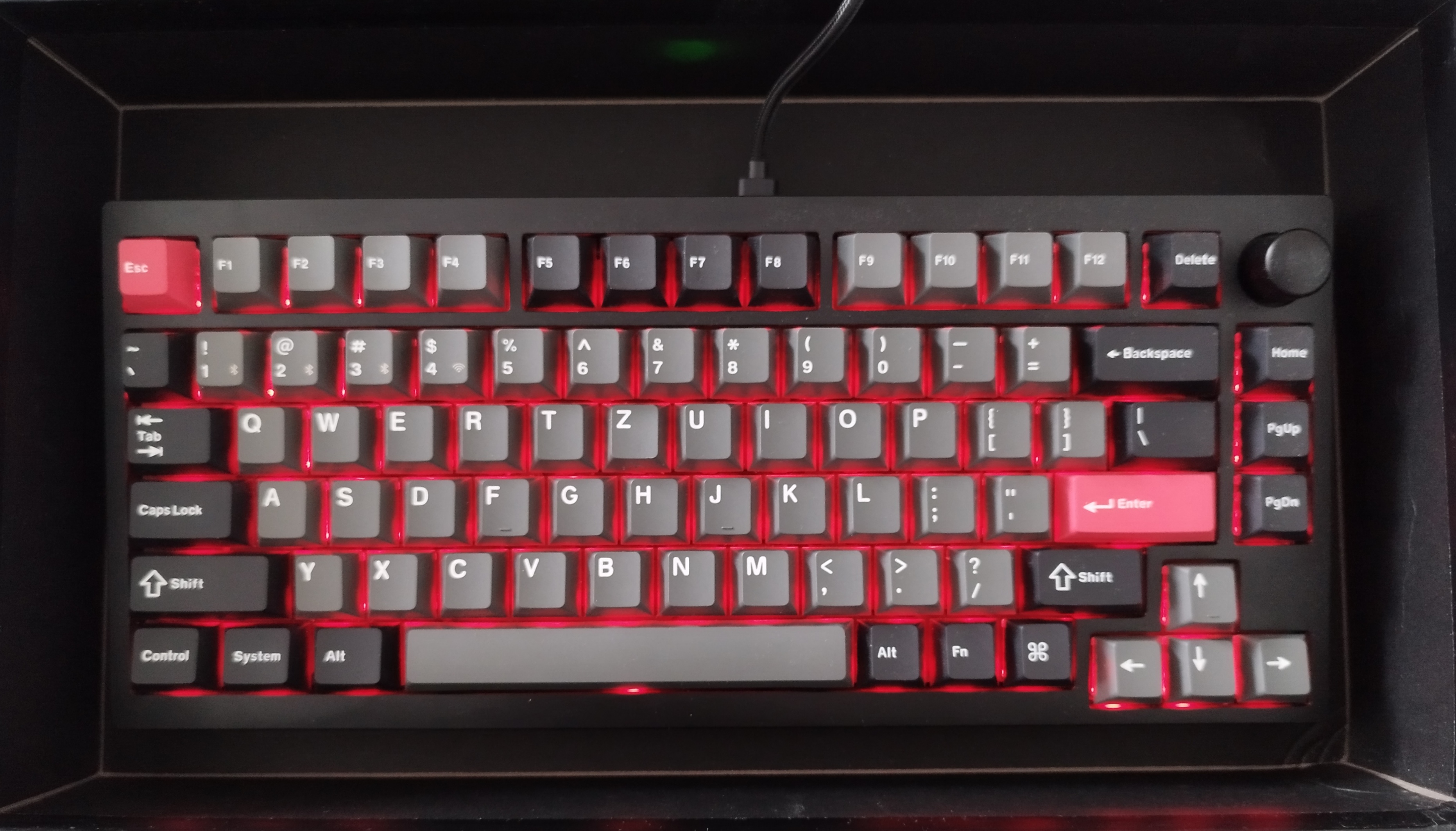
Keyboard

How I switch between layouts

sxhkd (Hotkey Daemon): Switch between us ansi and de with a key binding

The config: ~/.config/sxhkd/sxhkdrc

sxhkdrc
1
2
3
4
F1
    setxkbmap us && xsetroot -name "us"
F2
    setxkbmap de && xsetroot -name "de"

But remember, it resets to default everytime you reboot.

Optional: Quickly reload sxhkd with super + escape

bash
1
2
3
 # Reload sxhkd 
 super + @Escape
     pkill -USR1 -x sxhkd && xsetroot -name "reset sxhkd"

Set the default keyboard layout

Customize the keyboard layout system wide: /etc/X11/xorg.conf.d/00-keyboard.conf

vim
1
2
3
4
5
6
7
8
Section "InputClass"
        Identifier "system-keyboard"
        MatchIsKeyboard "on"
        Option "XkbLayout" "de,us_custom"
        Option "XkbModel" "pc104"
        Option "XkbVariant" ""
        # Option "XkbOptions" "grp:alt_shift_toggle"
EndSection

To prevent swapping Y and Z, create a custom XKB symbols file (or modify existing us layout in /usr/share/X11/xkb/) so that Y remains where it is in German layout.

Created custom us_custom in /usr/share/X11/xkb/symbols

us_custom
 1
 2
 3
 4
 5
 6
 7
 8
 9
10
11
12
13
14
15
16
17
18
19
20
21
22
23
24
25
26
27
28
29
30
31
32
33
34
35
36
37
38
39
40
41
42
43
44
45
46
47
48
49
50
51
52
53
54
55
56
57
58
// Keyboard layouts for the United States of America.

default partial alphanumeric_keys modifier_keys
xkb_symbols "basic" {

    name[Group1]= "English (US)";

    key <TLDE>	{[   grave,	 asciitilde	]};
    key <AE01>	{[	 1,	 exclam		]};
    key <AE02>	{[	 2,	 at		]};
    key <AE03>	{[	 3,	 numbersign	]};
    key <AE04>	{[	 4,	 dollar		]};
    key <AE05>	{[	 5,	 percent	]};
    key <AE06>	{[	 6,	 asciicircum	]};
    key <AE07>	{[	 7,	 ampersand	]};
    key <AE08>	{[	 8,	 asterisk	]};
    key <AE09>	{[	 9,	 parenleft	]};
    key <AE10>	{[	 0,	 parenright	]};
    key <AE11>	{[   minus,	 underscore	]};
    key <AE12>	{[   equal,	 plus		]};

    key <AD01>	{[	 q,	 Q		]};
    key <AD02>	{[	 w,	 W		]};
    key <AD03>	{[	 e,	 E		]};
    key <AD04>	{[	 r,	 R		]};
    key <AD05>	{[	 t,	 T		]};
    key <AD06>	{[	 z,	 Z		]};
    key <AD07>	{[	 u,	 U		]};
    key <AD08>	{[	 i,	 I		]};
    key <AD09>	{[	 o,	 O		]};
    key <AD10>	{[	 p,	 P		]};
    key <AD11>	{[ bracketleft,	 braceleft	]};
    key <AD12>	{[ bracketright, braceright	]};

    key <AC01>	{[	 a,	 A		]};
    key <AC02>	{[	 s,	 S		]};
    key <AC03>	{[	 d,	 D		]};
    key <AC04>	{[	 f,	 F		]};
    key <AC05>	{[	 g,	 G		]};
    key <AC06>	{[	 h,	 H		]};
    key <AC07>	{[	 j,	 J		]};
    key <AC08>	{[	 k,	 K		]};
    key <AC09>	{[	 l,	 L		]};
    key <AC10>	{[ semicolon,	 colon		]};
    key <AC11>	{[ apostrophe,	 quotedbl	]};
    key <BKSL>	{[ backslash,	 bar		]};

    key <AB01>	{[	 y,	 Y		]};
    key <AB02>	{[	 x,	 X		]};
    key <AB03>	{[	 c,	 C		]};
    key <AB04>	{[	 v,	 V		]};
    key <AB05>	{[	 b,	 B		]};
    key <AB06>	{[	 n,	 N		]};
    key <AB07>	{[	 m,	 M		]};
    key <AB08>	{[   comma,	 less		]};
    key <AB09>	{[  period,	 greater	]};
    key <AB10>	{[   slash,	 question	]};
};

Update sxhkd configuration

Now change the sxhkdrc accordingly:

sxhkdrc
1
2
3
4
F1
    setxkbmap de && xsetroot -name "de"
F2
    setxkbmap us_custom && xsetroot -name "us_custom"

Good luck!